


Free
$0
- 1 group
- 3 contacts
- 1 trusted helper
- 2 updates/month
Now on iPhone and Android
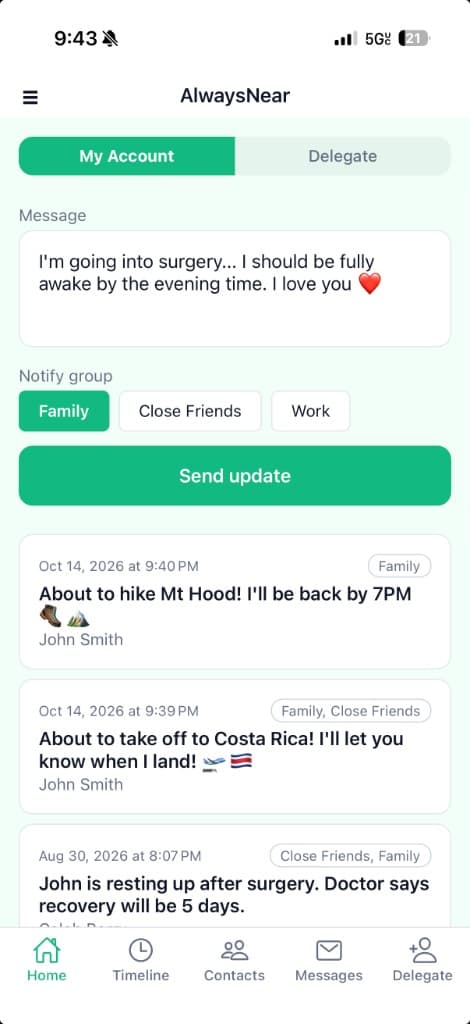
Send one private update to the people who matter by text or email — without repeating yourself, managing a group chat, or posting publicly.
Built from experience. AlwaysNear was inspired by a 43-day hospital stay in Lisbon, when more than 100 people wanted updates.
Example messages on this page are illustrative, not real conversations.
AlwaysNear App: Update for Jordan: Out of surgery and resting now. Everything went well. Reply STOP to opt out.
Before
Illustrative unread count: 12
After
AlwaysNear
One update to everyone who needs to know.
Write it once. The people you chose all hear the same thing.

In 2025 I was in an e-scooter accident in Lisbon. I needed emergency brain surgery and spent 43 days in the hospital, with complications that included a staph infection and blood clots.
More than 100 people wanted updates. Repeating the same news, again and again, helped inspire AlwaysNear: one private update to everyone who needs to know.
— Caleb Berry, Founder
Your family is waiting for an update. Send it once, and everyone who needs to know gets the same message.
Keep family posted while you are with someone who needs you.
Let people know you landed, checked in, or made it back from the trail.
Share the news you choose, with the people you choose.
One update after an appointment or a long day, instead of telling it again.
Moving day, a family emergency, a change of plans — everyone gets the same story.
Add the people you want to hear from you.
You send it when you are ready. Someone you trust can send it for you after they accept.
They do not need to download anything. The update arrives by text or email.
A trusted helper is someone you choose to help send updates on your behalf. You invite them. They accept in the AlwaysNear app. Then they can send for you, using the groups you already set up.
AlwaysNear App: Update for Jordan sent by an approved delegate: Out of surgery and resting now.
If a trusted helper sends the update, the text says it was sent by an approved delegate.
$0
$2.99/month
$4.99/month
Founder pricing is grandfathered for active subscribers. The store shows whether that trial applies at purchase.
AlwaysNear is not a replacement for 911 or local emergency services.
When a contact is added, AlwaysNear sends a one-time invitation SMS. The contact must reply YES before receiving emergency/status updates.
Updates are delivered only after explicit user action by the account holder or an approved trusted helper.
Learn more on our SMS Consent page.